Cablecast REFLECT and REFLECT+: Benefits of the Service
Overview
REFLECT and REFLECT+ are Cablecast Cloud Services that deliver your live streams and VOD content to viewers through a cloud content delivery network (CDN), so the number of viewers doesn't depend on your network's bandwidth. REFLECT+ also stores your VOD content in the cloud. This article explains the benefits of each service and how to choose between them.
Benefits of REFLECT
A REFLECT subscription gives you CDN delivery for one yearly fixed rate, with:
No data caps
No maximum file size
No viewership limits
Streaming Without REFLECT
You can stream live and VOD content using your own network's bandwidth. If you do, make sure your upload speed can keep up with viewer demand, because your server sends a separate stream to each viewer.
For example, if your content streams at 2.73 Mbps (typical for 720p video), each viewer uses 2.73 Mbps of your upload bandwidth. With a 10 Mbps upload speed from your internet service provider (ISP), you can support only 3 viewers at the same time before playback problems start.
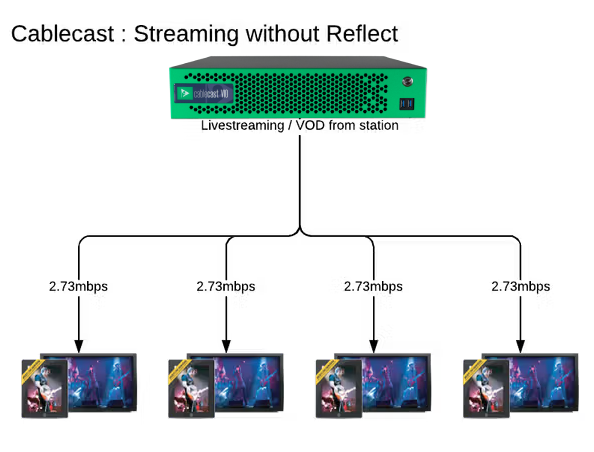
When your upload speed can't keep up, viewers see buffering: the video keeps pausing while your server tries to keep up with every request. This affects both VOD content and live streams.
How REFLECT Saves Bandwidth
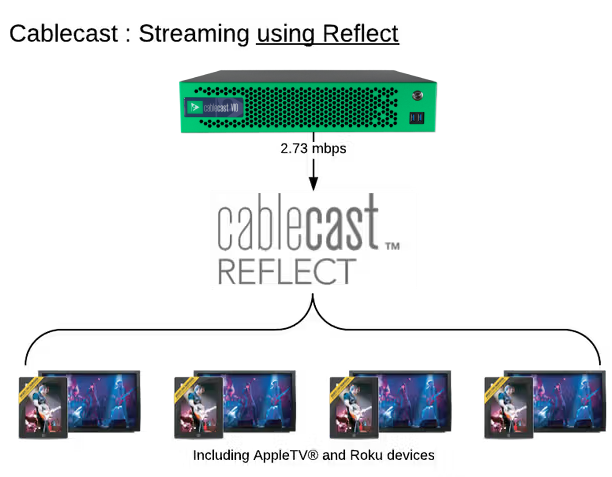
With REFLECT, your server sends each stream to the REFLECT CDN only once. The CDN then delivers it to your viewers, so your 2.73 Mbps stream uses the same upload bandwidth whether 3 or 300 people are watching.
Benefits of REFLECT+
REFLECT+ includes the CDN delivery of REFLECT and adds cloud storage for your VOD content. Pricing is based on tiered storage capacity.
Content stays available: Content stored in REFLECT+ streams from the cloud, separate from your network, so local power outages and bandwidth limits are less of a concern.
Storage that scales: REFLECT+ starts with 10 TB of cloud storage, and you can add more in 1 TB increments.
Automatic uploads: You choose which VOD content goes to the cloud using Saved Searches, and Cablecast uploads the matching shows automatically.
No external address needed: Cablecast pushes content to the cloud, so your Cablecast server doesn't need an external address or open inbound firewall ports. It only needs outbound internet access on port 80.
Tip: To set up REFLECT+, see Cablecast Cloud Services: REFLECT+ Dashboard and REFLECT+ Content.
Choosing Between REFLECT and REFLECT+
REFLECT: Best for organizations that want scalable CDN delivery but prefer to keep their content stored on-premises.
REFLECT+: Best for organizations that want their VOD content stored in the cloud, or that are security-conscious and can't or don't want to open external access to their Cablecast server to make content available to the public.
Note: If you have both Cablecast Live and Cablecast VOD hardware, your subscription must cover both. For details, see REFLECT Subscription Requirements for Live and VOD.
Stream to OTT and Mobile Apps
With REFLECT or REFLECT+, you can also stream your live and VOD content to Roku, Apple TV, Fire TV, iOS, and Android devices. To learn more, see OTT and Mobile Streaming Apps on the Cablecast website.
Summary
REFLECT delivers your live streams and VOD content through a cloud CDN for one yearly fixed rate, so your upload bandwidth no longer limits how many people can watch. REFLECT+ adds tiered cloud storage for your VOD content, keeping it available even when your local network isn't. For pricing or help choosing a service, contact sales@cablecast.tv.
