How To Create An Account For FireTV On The Amazon Appstore
Introduction
This article will describe how to create an account for FireTV. When complete, the Cablecast Engineering team will be able to build your white labeled Screenweave channel for you to submit to the Amazon Appstore.
Create Accounts
Create a regular customer account at Amazon.com
The requires using a mobile number unique from an other Amazon accounts, which they verify via sms. If necessary, you can circumvent this by instead making your account at amazonforum.com then using it to login at amazon.com - only then will it give you the "not now" option at the mobile number page.
Using the same email as your customer account, create an Amazon Developer account at the Amazon Apps & Games Developer Portal
This also requires you to enter a phone number but doesn't verify it.
Make note of the Company Name you enter here, you'll need to tell us this in a later step
Allow TRMS to submit apps for your account
Upon finishing account creation, you'll be sent to https://developer.amazon.com/dashboard - got to Settings as shown
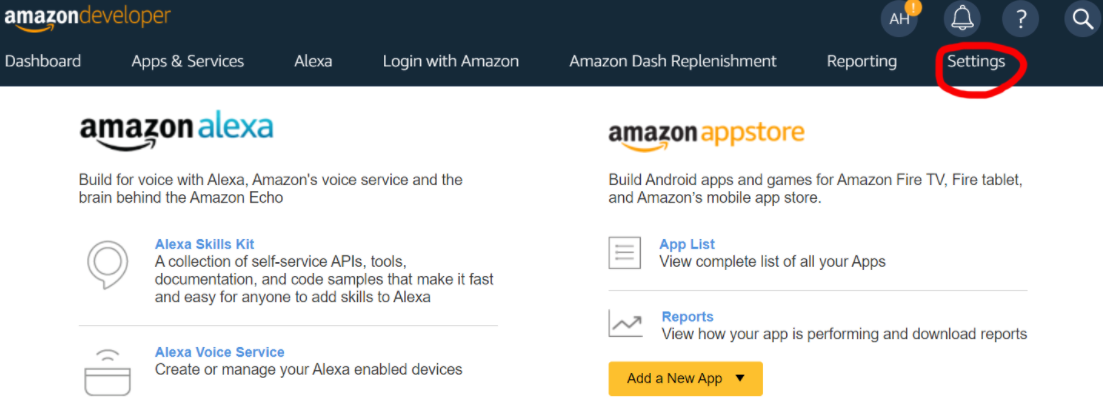
Settings has a second layer of navigation where you'll find User Permissions

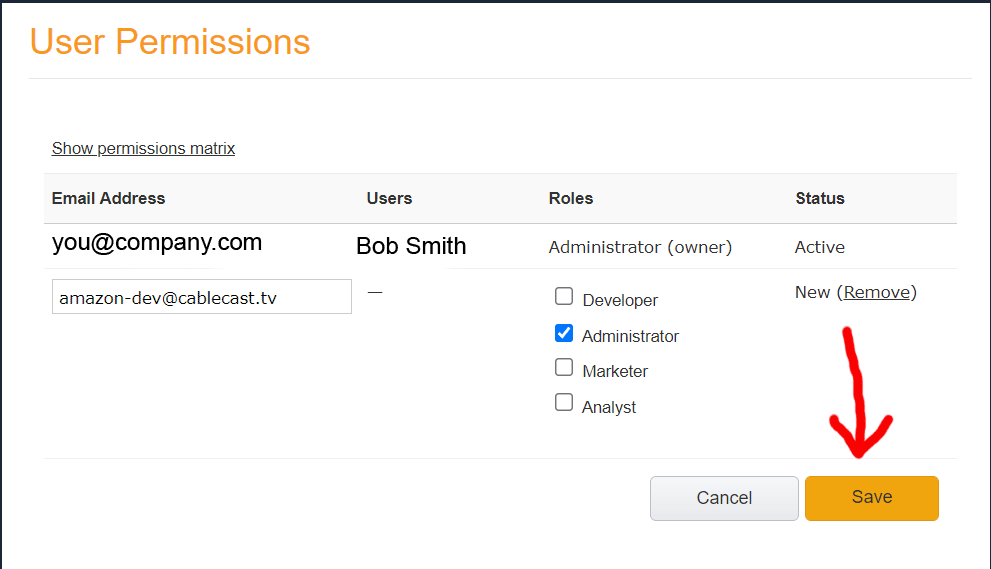
You'll see a table of users with only yourself in it to start. Under this is the Add New button which opens a form to add a user, fill it out as so:
Email: amazon-dev@cablecast.tv
Role: Administrator
Don't forget to press Save
Request Whitelabeled App
Engineering can make your app once you provide the following information:
The usual branding assets. We can make all the required images from generic assets.
The App Name you want to use on the Appstore.
The Company Name of your Amazon Developer account.